Loess.ru

having fun

Each neuron is two-layer computational network. And it strives for living

«… Yet, it is fascinating that, while surviving, a neuron makes computation.»
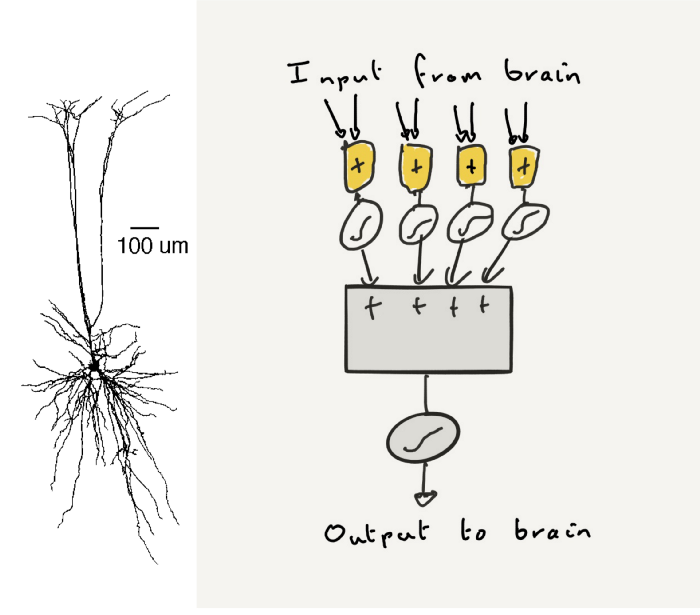
https://medium.com/the-spike/neuron-core-computational-principles-ed0fe9cfb711

https://medium.com/the-spike/your-cortex-contains-17-billion-computers-9034e42d34f2

Ася Казанцева. Как сдать любой экзамен, выучить иностранный язык и почему алкоголь меняет память?

44:44 — про организацию внешних ситуаций для того, чтобы жить правильно (правило 20 секунд)
49:25 — про дневники и историю в чятиках

Основы Wi-Fi (English)

magnet:?xt=urn:btih:7AA59D421CABD2400FD7CDDA9DB4738F0A89398C&tr=http%3A%2F%2Fbt2.t-ru.org%2Fann%3Fmagnet&dn=%5Bcwnp%5D%20CWS-100%20eLearning%20%5B2019%2C%20ENG%5D

Курс входного уровня по wi-fi сетям. После изучения Вы сможете разбираться в основных технических деталях и грамотно планировать маленькие сети.

The Certified Wireless Specialist (CWS) eLearning course teaches the language of Wi-Fi as well as the typical hardware and software used in wireless local area networks (WLANs). The course is an exceptional starting point for those in wireless sales, marketing, entry-level support, and decision-making professionals related to 802.11 wireless networks.
Спасибо https://github.com/ytdl-org/youtube-dl/releases

Содержание:
Read More

A fun way to learn HTML

Js-скрипт, позволяющий редактировать HTML in-place. Подойдёт новичкам и тем, у кого нет нормального анализатора/подсветки кода. С CSS — не работает.
https://x-ray-goggles.mouse.org/

Useful Zabbix scripts

https://github.com/grundic/zabbix-disk-performance

https://github.com/IvanBayan/Zabbix-lm-sensors-lld (https://share.zabbix.com/unsorted/lld-script-for-sensor-type-items-based-on-lm-sensors) (без триггеров и итемов, только дискавери)
https://github.com/blind-oracle/zabbix-sensors (https://share.zabbix.com/cat-server-hardware/sensors) (с триггерами)
https://github.com/nobodysu/zabbix-mini-IPMI/ (https://share.zabbix.com/cat-app/zabbix-mini-ipmi)
(в поиске https://share.zabbix.com/search?searchword=linux+sensors&search_cat=1 — всего три скрипта, это они и есть)

https://github.com/v-zhuravlev/zbx-smartctl (https://share.zabbix.com/storage-devices/smart-monitoring-with-smartmontools-lld) (инструкция https://serveradmin.ru/monitoring-smart-v-zabbix/)

https://github.com/delin/Zabbix-NUT-Template

оповещения в Tg, пошаговая инструкция: https://serveradmin.ru/nastroyka-opoveshheniy-zabbix-v-telegram/

Агрессия: как всё у людей // Лекция Евгении Тимоновой 01.04.2019

Эпик. Агрессия: как всё у людей // Лекция Евгении Тимоновой 01.04.2019:

По мотивам книги «Биология добра и зла. Как наука объясняет наши поступки» by Роберт Сапольски

All you need for telestudio is OBS

How to output from OBS to multicast/unicast:
Settings -> Output -> Output Mode -> Advanced
Recording -> Type -> Custom Output (FFmpeg)
FFmpeg Output Type -> Output to URL
File path or URL -> udp://224.0.0.1:1234?pkt_size=1316&buffer_size=65535 (working example, tweak it)

Alternatively you can directly send to just one PC in your system by using his IP, for example: udp://192.168.0.5:9999?pkt_size=1000
You can use any port that is free and accessible on the PC’s you want to use.
…
Container Format -> Depends on the protocol, for udp it would be mpegts
Video Bitrate -> 2500 or higher (depends on your encoder)
Audio Bitrate -> 128 or higher (depends on your encoder)
…
Activate the checkbox «Show all codecs»
Be aware, some combinations and codecs will not work for streaming! You will have to test to find your best combination.
Video Encoder -> libx264 / h264_nvenc (if you have an nvidia gpu) or other codecs can be used
Audio Encoder -> AAC, AC3 or even OPUS can be selected.
…
Start a Recording, not a Stream.
You can now watch the stream in VLC (for example) on another PC in your local network. Open a network stream in VLC and enter the following address: udp://@224.0.0.1:1234(if you used this address as the «File Path» earlier, in the case of streaming to one pc you can enter udp://@:9999 on the receiving PC)

via https://obsproject.com/forum/resources/obs-studio-send-an-udp-stream-to-a-second-pc-using-obs.455/
ffmpeg UDP in/out syntax https://www.ffmpeg.org/ffmpeg-protocols.html#udp
more relay and ffmpeg examples https://obsproject.com/wiki/Streaming-With-SRT-Protocol
OBS scene scheduling/time-based switching https://obsproject.com/forum/threads/scene-change-and-stream-scheduler-based-on-date-time.95375/

If you need to send multicast to specific windows interface:
route add 224.10.20.30/32 inter.fa.ce.ip

How to add Claymore rigs hashrate into Zabbix

Quick, dirty, no changes in rigs configs needed — http gathering:

1. Check your rig web-interface availability from zabbix-agent host https://rig.ip.address:3333/
2. Make script to return hashrate from web page
wget -nv -q -O - http://$1:3333 |grep -oP '(?<=result).*?(?=;)'|awk '{print $NF}'|sed -e 's/^"//'
3. Add this script into /etc/zabbix/zabbix_agentd.conf as
UserParameter=getrighashrate[*],/usr/lib/zabbix/externalscripts/script.sh
and restart zabbix-agent service
4. Check either by
zabbix_agentd -t getrighashrate[rig.ip.address]
or
zabbix_get -s 127.0.0.1 -k getrighashrate[rig.ip.address]
5. Add items into Zabbix into zabbix-agent host and multiply values by 1000. Add graphs into your fav dashboard

Quick, dirty, snmp and logs-involved:

1. Install and run snmpd at every rig
2. At every rig add script to return current logged hashrate:
tail -n 200 /var/log/miner/claymore/lastrun_noappend.log |grep "ETH - Total Speed"|tail -n1|awk '{print $7}'
3. Add this script into /etc/snmp/snmpd.conf as
extend hashrate /path/to/snmp.script
and check for security at extension table
view systemonly included .1.3.6.1.4.1.8072.1.3.2
and restart snmpd service
4. Check this with
snmpget -c public -v2c localhost .1.3.6.1.4.1.8072.1.3.2.4.1.2.8.104.97.115.104.114.97.116.101.1
5. Make Zabbix template with snmpv2 item with your fav {$SNMP_COMMUNITY} and apply this to every rig in Zabbix

Additional чтиво:
https://bitcointalk.org/index.php?topic=3959954.0 https://www.ekzorchik.ru/2017/05/monitoring-the-temperature-of-the-raspberry-board/ https://www.ekzorchik.ru/2016/06/monitoring-the-weather-by-zabbix/